2000s Camera Filter
An online Y2K photo editor for the 2000s digicam vibe — warm color, soft grain, and a nostalgic fade.
No photo? Try a sample
Presets in this editor
2000s Y2K
Loads automatically on this pageWarm, faded early-digicam color with soft grain and a gentle vignette.
The exact values this preset sets, so you can rebuild or tweak it by hand:
iPhone 4
Soft edges, gentle grain, slightly warm 2010s smartphone vibe.
Grain 38 · Softness 32 · Vignette 18
Warm Digicam
Golden-hour point-and-shoot warmth with punchy colors.
Grain 28 · Softness 18 · Warmth 66
Cool CCD
Cleaner, slightly cool vintage sensor feel (subtle green/cyan lean).
Grain 22 · Softness 14 · Aberration 12
Flash Pop
Harsh highlights + glow like a built-in flash at night.
Bloom 20 · Grain 18 · Contrast 60
Soft Nostalgia
Dreamy, faded, warm — heavy softness + bloom for a nostalgic vibe.
Softness 48 · Grain 30 · Bloom 26
Disposable Flash
Hard close-flash glow, warm grain, casual single-use snapshot energy.
Grain 26 · Bloom 24 · Softness 12
Huji-Style
Warm flashed glow with grain, made for the corner date stamp.
Grain 29 · Softness 14 · Bloom 14
Dazz-Style
Cool CCD glow with extra bloom and old-sensor color fringe.
Grain 22 · Bloom 14 · Aberration 13
Kodak Gold
Golden film warmth with soft skin tones and fine grain.
Grain 22 · Warmth 63 · Softness 12
35mm Film
Fine grain and restrained, true-to-life analog color.
Grain 25 · Softness 14 · Vignette 8
Film Grain
Fine, even film texture over otherwise natural color.
Grain 35 · Softness 10 · Fade 10
Lomo Punch
Dark toy-camera vignette with loud, punchy color.
Vignette 30 · Grain 23 · Saturation 62
Vintage Fade
Old-print warmth with lifted blacks and darkened corners.
Grain 28 · Fade 21 · Softness 20
Polaroid
Washed instant-film fade with gentle warmth and a soft glow.
Softness 22 · Fade 21 · Vignette 20
70s Print
Heavily faded amber print: washed-out blacks, low saturation, soft detail, dark corners.
Fade 30 · Grain 28 · Softness 26
80s Print
Faded drugstore-print colour: warm, pink-leaning, low contrast, soft grain.
Grain 32 · Fade 26 · Softness 24
90s Snapshot
Point-and-shoot flash, coarse film grain, punchy lab colour, neutral warmth.
Grain 34 · Bloom 18 · Softness 12
Matcha Latte
Soft matcha green: pale soft highlights, a green-olive cast, gentle haze, clean detail.
Tint 80 · Softness 22 · Grain 18
Frequently Asked Questions
It is the feel of early digital cameras and first-generation camera phones: warmer color, lower dynamic range, a gentle grain, and a slightly faded, nostalgic finish. It reads as imperfect-on-purpose.
Yes. The Y2K camera filter, the early 2000s camera filter, the 2000s photo filter, and the 2000s camera effect all describe this same warm, faded look, and this page does all of them. Load a photo, start from the warm preset, and adjust to taste.
Yes, in the sense most people mean: it is a website where you load a photo, apply a Y2K look, adjust it with sliders, add an optional date stamp and download it, all free and without an app. It is a filter editor rather than a design tool, so there are no stickers, frames, collages or crop, and nothing is uploaded.
They overlap a lot. The 2000s/Y2K look leans warm and faded, CCD leans cool and glowing, and iPhone 4 is soft with a gentle warmth. The easiest way to choose is to try each preset on the same photo.
Start warm, add grain and a little fade, drop saturation slightly, and finish with a subtle vignette. Avoid going too clean. The charm is in the imperfection.
Very well. Add a touch of softness and warmth, and keep grain moderate so skin still looks natural.
You can get close with the sliders, but exact matches depend on lighting and the original camera. Treat it as a vibe rather than a clone.
Yes. Export at original size for quality, or resize to 1080px on the long edge for faster uploads.
No. Processing is local to your browser, so your photos stay private.
Yes. Press the camera button, take a photo with your webcam or phone camera, and the 2000s preset is applied the moment it reaches the editor. It captures a still photo rather than filtering live video, and nothing is uploaded.
About This Tool
The early 2000s had a distinct photographic feel, and it is back in a big way. Early digital cameras and the first camera phones produced warmer color, a lower dynamic range, a soft grain, and a slightly faded finish. Photos looked imperfect, and that imperfection is the whole appeal of the Y2K revival.
This page recreates the 2000s digicam look. Load a photo and the 2000s Y2K preset is applied automatically, warm and slightly faded. From there, the moves that matter are Warmth (push it up), Fade (a little goes a long way), and Grain for texture, finished with a subtle vignette.
For the strongest 2000s vibe, drop saturation just slightly so colors feel a touch washed, then add grain and fade until the photo loses its modern "clean" sheen. Selfies and group shots respond especially well. Add a little softness and warmth and the nostalgia lands immediately.
People call this look a lot of things: the Y2K camera filter, the early 2000s camera filter, a 2000s photo filter, or just the 2000s camera effect. They all point to the same warm, faded, slightly grainy feel, and this page gives you one place to get it on any photo, with sliders to push it as far as you like.
It runs entirely in your browser, so your photos never leave your device, and it works on mobile and desktop including iPhone HEIC files. It is free, with no sign-up and no watermark, and exports look great resized for social or kept at full size.
Choose settings for the photo you have
Compare the same source at 45% and 100% strength. These are generated example photos, not real-camera calibration or a skin-tone accuracy test. The edited versions were rendered with this editor; faces and framing are unchanged.
Daylight portrait

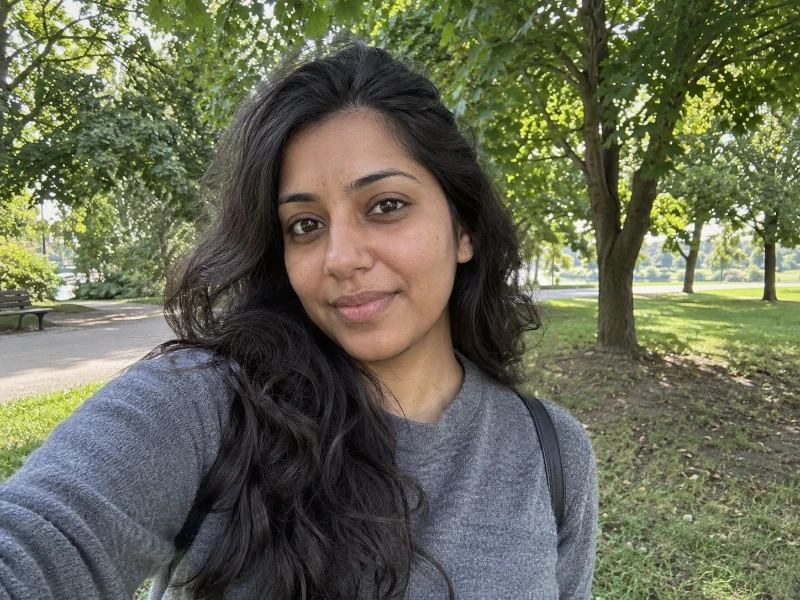
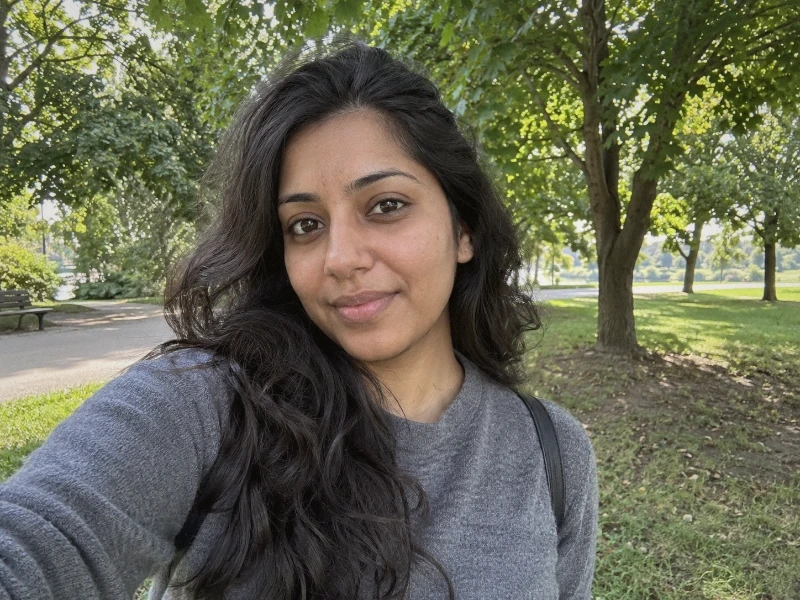
Start at 45% strength. Check the face before the background: if skin looks too orange, lower Warmth toward 50 before adding grain.
When to back off: More strength also means more warmth and texture. If skin loses detail, reduce strength or Softness; a faded look is not a reason to wash out a face.
Exact settings for this comparison
- grain
- 16
- softness
- 16
- contrast
- 48
- saturation
- 47
- warmth
- 56
- tint
- 51
- highlights
- 46
- shadows
- 54
- vignette
- 16
- aberration
- 8
- fade
- 18
- bloom
- 6
Only strength changes between the two grades. Original crop; textures, frame and date stamp off. In compatibility mode, unsupported controls are disabled and the result can differ.
Direct-flash night photo
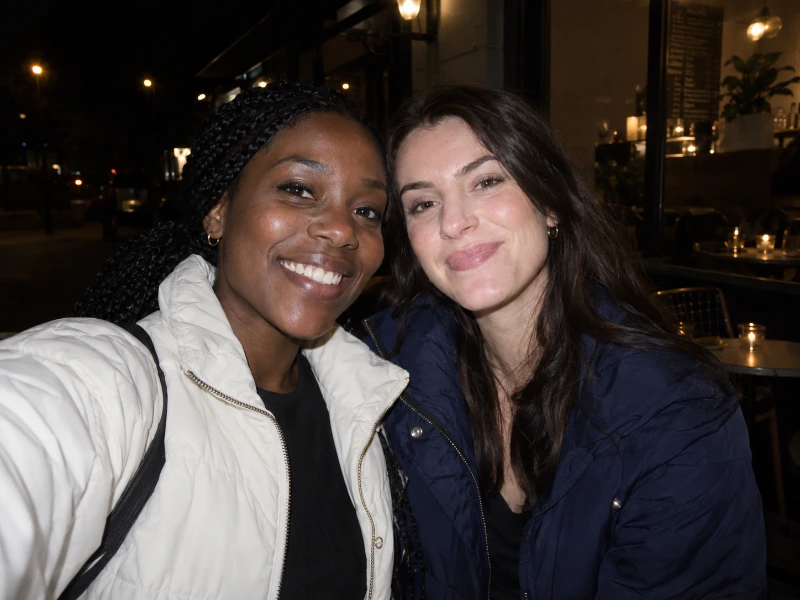
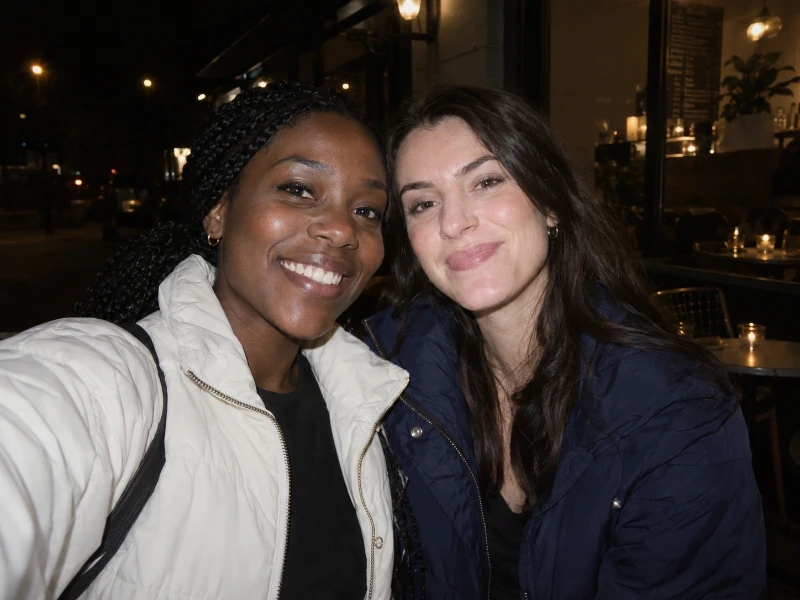
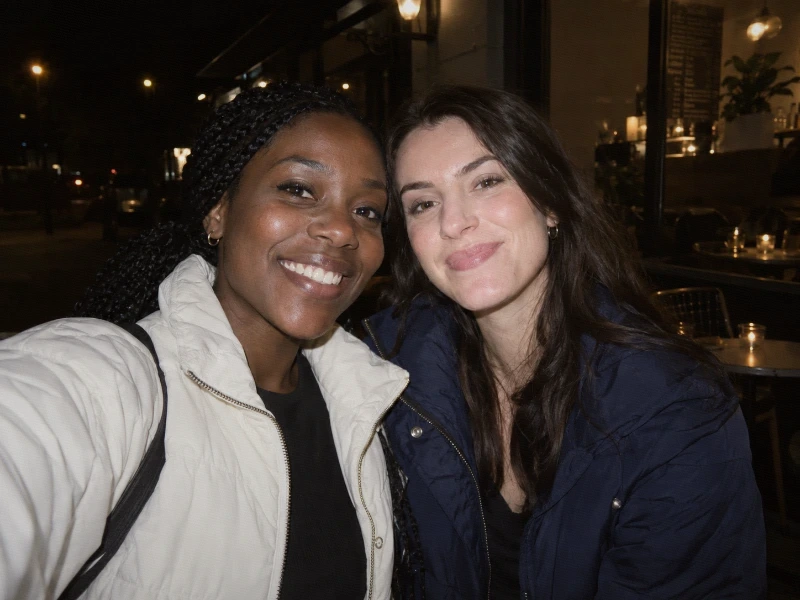
The source already has flash lighting. Check the white jacket and face highlights; keep Bloom low when lights already glow.
When to back off: A stronger grade cannot add a flash to an unlit scene or recover clipped highlights. Lower strength if the jacket or faces lose separation.
Exact settings for this comparison
- grain
- 18
- softness
- 10
- contrast
- 48
- saturation
- 47
- warmth
- 54
- tint
- 51
- highlights
- 46
- shadows
- 54
- vignette
- 16
- aberration
- 8
- fade
- 4
- bloom
- 8
Only strength changes between the two grades. Original crop; textures, frame and date stamp off. In compatibility mode, unsupported controls are disabled and the result can differ.
Friends in daylight



Judge every face, not just the brightest one. Keep the original crop and start at 45%; use the same settings for a small batch after checking each image.
When to back off: One setting may suit one face but not another. If darker faces lose detail or lighter ones look flat, back off contrast and strength rather than adding more fade.
Exact settings for this comparison
- grain
- 16
- softness
- 10
- contrast
- 50
- saturation
- 47
- warmth
- 54
- tint
- 51
- highlights
- 46
- shadows
- 54
- vignette
- 16
- aberration
- 8
- fade
- 18
- bloom
- 4
Only strength changes between the two grades. Original crop; textures, frame and date stamp off. In compatibility mode, unsupported controls are disabled and the result can differ.
For a warmer, punchier digital starting point, compare the other camera look. Learn how to correct a result in the settings guide.
Y2K warmth versus CCD color and disposable brightness
Compare the desk color first, then the laptop highlights. Choose Y2K for the warmer treatment here, CCD for a cooler alternative, or disposable for a brighter, harder-looking snapshot.

Use the silver laptop, wooden desk and hand as reference points for brightness and color.

The wooden desk looks warmer than in the CCD version, with visible texture across the laptop and darker shirt.

The laptop looks cooler than in the Y2K version. The desk remains warm: a cool treatment does not turn every surface blue.

The laptop base and cup are much brighter, while the dark shirt stays deep. Watch those bright surfaces when choosing a stronger look.
These existing examples illustrate the looks; they are not a calibration of the current sliders. The edited versions also have different decorative date stamps, separate from color and texture. This indoor scene does not demonstrate portrait or night results.
Choose a photo for the 2000s look
The 2000s Y2K preset starts with warm color, fade and grain. These are stylistic approximations, not sensor simulations: real compact-camera photos varied with the model, lighting, lens and processing. Use these current settings as a starting point, then judge your own subject rather than trying to match a particular camera year.
Preset values on the editor’s 0–100 sliders; these are not percentages of effect strength.
Portraits: judge skin before the background
Start with a window-lit selfie or a group photo where faces are already clear. For a mild look, lower Grain and Fade from the preset and keep detail around the eyes. For a stronger look, keep the fade and add texture gradually. Reduce Warmth if skin turns orange; extra softness cannot fix missed focus.
Daylight: keep whites and sky readable
Everyday street scenes, a café table or a sunlit room give you recognizable colors to compare. For a mild edit, pull Warmth toward neutral and lower Fade. For a stronger edit, keep the warm, faded palette before adding more grain. If a white shirt or cloud loses detail, ease back on Contrast or Highlights.
Night: start with light on the subject
Choose a photo with a lit face or an existing flash-lit foreground. For a mild edit, keep Bloom low and reduce added Grain if shadows already look noisy. For a stronger party look, try Disposable Flash and check the face before increasing glow. A filter cannot light an unlit face or recreate the direction of a camera flash.
Want a harder night snapshot? Try the disposable camera filter. For more adjustments by subject, see best retro settings.
Digicam, Y2K, CCD and film describe different things
Digicam refers to digital cameras and, more loosely, their snapshot aesthetic. Y2K is a broader visual style that can include warm snapshots and date stamps. CCD names a sensor technology, which does not guarantee a particular color or glow. Film is a different capture medium; a grain overlay here does not reproduce its physical response to light.
Compare the cooler CCD filter if Y2K feels too warm, or the more neutral 35mm film filter for restrained color. The digital camera filter comparison helps choose a starting treatment, while the retro looks guide compares the wider family.
Finishing details without losing the photo
A 4:3 composition can evoke compact-camera snapshots; crop in your usual photo app if it helps the framing. Keep the subject intact rather than shrinking the file just to imitate a low megapixel count. A corner date stamp is an optional visual cue, not evidence of when the image was taken.
If the result still feels modern, check the source photo. Strong sharpening or HDR processing may remain visible after a color treatment. Grain, fade and softness change the appearance; they cannot reverse earlier processing or recover clipped detail. Compare with the original and stop when faces and important highlights remain readable. For capture tips, read how to get an old digital camera look.
See the difference


How to get the 2000s vibe
- 1
Upload your photo
Selfies and group shots respond beautifully. The photo never leaves your browser.
- 2
Start from 2000s Y2K
The 2000s Y2K preset loads automatically, giving you the warm, slightly faded early-digicam base color in one tap.
- 3
Add fade and grain, export
A little Fade and Grain takes away the modern "clean" sheen. Finish with a subtle vignette and download.
A 2000s recipe
Want to build it by hand? This combination gets the nostalgic, imperfect feel without overdoing it.
2000s vs the other retro looks
The 2000s look is warm and faded, which makes it the most forgiving on skin. The CCD look is cooler and glowier, and the disposable look is harder and flash-heavy. If you want more punch, try Cool CCD; for more snapshot energy, try Flash Pop.
How to make photos look like an old digital camera
A walkthrough for the wider old-compact look, beyond the 2000s preset on this page.
Try another look
Not after a whole look? You can also stamp a date on it or age the photo itself. The rest are on the tool list.